Go Outdoors Idaho
- 3.8
- Rating
- 100.00K
- Installs
- Free
- Price
 Analysis by App-foxy
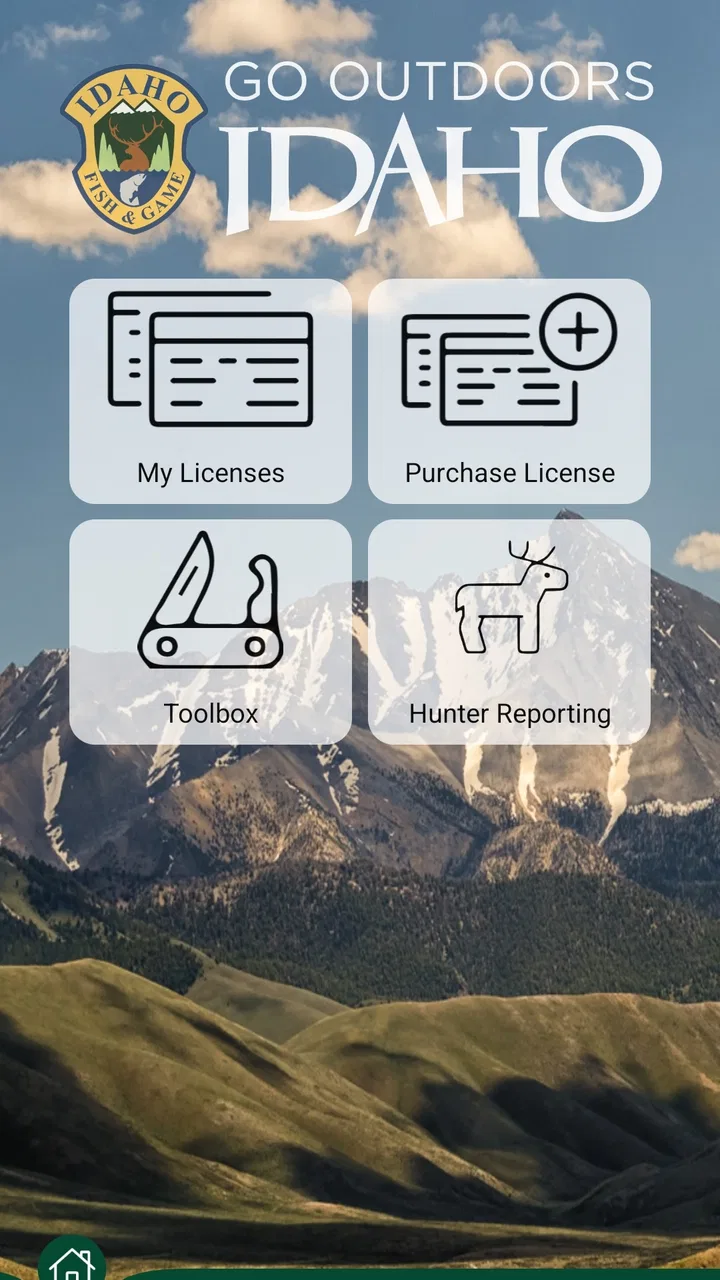
Go Outdoors Idaho is the official sports and outdoor app from the Idaho Department of Fish and Game, and I found its value in a very practical place: it puts Idaho-specific hunting, fishing, and wildlife tasks closer to hand when I am planning a trip or already outside. It is free, rated for Everyone, and developed by Go Outdoors Idaho, so it feels aimed at residents, visitors, and families who need a direct connection to Idaho’s outdoor activities rather than a broad social platform or a general mapping tool.
I would not install it expecting a complete replacement for every outdoor app on my phone. Its strength is being a focused state resource. The useful question is not whether it has the biggest feature set, but whether your plans involve Idaho Fish and Game services often enough to benefit from having them in one place. In my experience, that makes it most appealing to people who hunt or fish in Idaho, check state-specific information regularly, or prefer handling outdoor administration from a phone instead of searching through several web pages.
How I use it before, during, and after an Idaho outdoor trip
My baseline workflow starts before leaving home. I open the app with a specific task in mind rather than browsing aimlessly: preparing for a fishing outing, checking information connected with a hunting plan, or looking for the right state service. That small change matters. Government apps can feel slower when treated like entertainment apps, but they become much more useful when I already know what decision I need to make.
You May Also Like

 Blood Strike: 2.5 Anniversary
Blood Strike’s Loadouts Turn Every Drop Into a Tactical Gamble
A close look at Blood Strike’s custom loadouts: how fast access to signature weapons reshapes its battle royale rhythm, rewards preparation, and narrows the gap between fights.

 Pandora - Music & Podcasts
Pandora’s Music Is Easy to Start, but Harder to Recover
Pandora’s strength is its low-effort path from a seed to a station. Its weak spot is how much confidence it asks you to place in connection, setup, and quiet recovery.

 8 Ball Pool
 Is Built on Rivalries, Rematches, and Routine
A close look at the rivalries, rematches, shared routines, and unanswered safety questions that turn a quick pool match into a persistent mobile community.

 Samsung Music
’s Quiet Strength Is Playing What You Already Own
Its reach comes less from spectacle than from dependable access to a personal library. That simplicity is both the app’s strongest retention engine and its ceiling.

 AccuWeather: Weather Radar
AccuWeather Review: A Quick, Clear Forecast for Everyday Decisions
For everyday plans, the best forecast is the one you can understand quickly. AccuWeather makes rain timing, radar, and local conditions easy to act on, with a few trade-offs.

 Hill Climb Racing
Why Hill Climb Racing Still Turns Crashes Into One More Run
A tiny car, a bumpy hill and one more upgrade: Hill Climb Racing keeps resurfacing because its simple chaos makes every near-miss feel personal.
More From Our News Desk
View All News


For a weekend fishing trip, I would use it as one part of a preparation checklist. I first identify the area and the activity, then review the relevant Idaho information available through the app. After that, I keep the app available for a quick reference instead of assuming it will replace a paper plan, navigation app, weather service, or local knowledge. This division of labor is important: the state app is the place I trust for Idaho-specific official context, while other tools may be better for route planning or changing conditions.
A realistic everyday example is a Saturday morning when I am leaving early and realize I need to confirm an outdoor detail before driving. Rather than opening a search engine and sorting through general results, I would go directly to the state-focused app, find the relevant section, and make a note of anything that affects the outing. If I am traveling with family, I can do that preparation before everyone gets into the car, which is much less stressful than trying to solve administrative questions from a trailhead or boat launch.
The same approach works for hunting preparation, although I would be deliberate about checking all applicable information before relying on a phone screen in the field. A mobile app is convenient, but battery life, weak reception, glare, cold weather, and wet hands are real outdoor problems. I treat the app as a planning and reference companion, not as permission to ignore regulations, maps, equipment checks, or a backup plan.
After an outing, the app can also fit into a repeatable routine. I review anything I need to remember while the trip is still fresh, then prepare the next outing from the same starting point. This is a better habit than opening it only when I am already under pressure. The more often I use the same path through the app, the easier it becomes to recognize where a particular task belongs.
What makes the state focus useful
The biggest advantage over a general outdoor app is relevance. A national fishing app may offer attractive maps, forecasts, community reports, or broad destination coverage, but it cannot be as naturally centered on Idaho Department of Fish and Game services. Go Outdoors Idaho is narrower, and that narrowness is a benefit when the question is specifically about Idaho rather than outdoor recreation in general.
I also prefer a focused official source when the subject involves state-managed activities. Search results can mix current and outdated pages, private advice, and information from other states. Starting with the department’s own app reduces that confusion. It does not remove the need for judgment, but it gives me a cleaner first stop.
That focus also explains who should skip it. If you rarely visit Idaho, only want a universal trail map, or mainly need turn-by-turn navigation, a mapping app will probably serve you better. If you are looking for a social feed full of recent user reports, this is not the experience I would choose first. The app makes more sense as an official utility than as a community-driven discovery service.
Settings and phone habits worth checking
I pay attention to the phone settings around any outdoor app, even when the app itself is straightforward. Before a trip, I check that notifications are not being silenced by a blanket focus mode, that the phone has enough storage for normal updates, and that the display will remain readable outdoors. These are simple steps, but they prevent the common mistake of blaming the app when the phone is hiding alerts or making the screen impossible to read in bright sun.
I also make sure I understand how the app behaves with connectivity. I do not assume that an app connected to a government department will provide every resource offline, and I do not plan a remote trip around uninterrupted mobile data. Before driving into an area with uncertain reception, I review important information in advance and keep essential details accessible in another form. This is one of the most useful habits I can recommend: prepare while connected, reference while outside.
Battery management deserves the same attention. I reduce unnecessary screen time, carry a power bank when the trip is long, and avoid leaving the app open continuously just because I may need it later. If navigation is running at the same time, the phone can drain faster than expected. The app is more helpful when it is part of a sensible equipment plan rather than the only place where every detail exists.
Privacy and permissions are also worth considering in ordinary language: I look at what the phone asks the app to access and decide whether that access makes sense for the task I am doing. I do not automatically enable every setting. At the same time, I avoid disabling something essential without understanding the consequence. The right balance is to grant only what I am comfortable with and then test the workflow before leaving home.
One setting-related habit that improves the experience is keeping the app updated through the normal app-store process. The current version is 2026.249.0, and the app supports devices running Android 9 or later. That makes it accessible to many older Android phones, but compatibility alone does not guarantee a smooth field experience. I still test the app on my actual phone, with my actual network, before depending on it for a trip.
Faster patterns for people who use it repeatedly
Experienced users usually save time by standardizing the first minute. I keep a short mental checklist: open the app, go to the service connected with today’s activity, review the information that can change, and then close it rather than wandering through unrelated sections. This prevents the app from becoming another place where I spend time browsing without making a decision.
A second useful pattern is separating preparation from confirmation. I do the detailed review at home, when I have a charger, stable internet, and time to read carefully. On the day of the trip, I use the app for a shorter confirmation pass. That approach is faster and safer than attempting the entire process in a parking area with poor reception and a group waiting to leave.
I would also keep a written note of the exact information I need to revisit. For example, instead of remembering only that I “checked the app,” I note the activity, area, and question I was resolving. This makes the next visit more purposeful and helps me notice when I need to verify something again. It is a small workflow improvement, but it is more reliable than repeatedly searching through the same menus from memory.
For families, I would assign one person to handle the official information while another manages directions, food, and equipment. That avoids several people tapping through the app at once and reduces the chance that an important detail gets missed. For a group hunting or fishing trip, sharing the preparation checklist is more useful than simply telling everyone to download the app. Each person should know what has been checked and what remains their responsibility.
Another practical habit is using the app at the same point in every trip cycle. I might check it when packing, again before departure, and once more if the plan changes. Repetition creates a dependable rhythm without requiring constant notifications or unnecessary phone use. This is especially helpful for occasional users who do not remember the layout between seasons.
Where it cannot replace other tools
Go Outdoors Idaho is not the app I would choose as my only source for navigation. A dedicated map service is usually better for route planning, terrain awareness, driving directions, and understanding how long a journey may take. The state app’s role is more specific: it helps connect an Idaho outdoor activity with the department’s official resources. Trying to force it into the role of a full navigation suite would make the experience feel limited.
The same applies to weather. I would check a reliable forecast separately, especially for mountain conditions, wind, storms, or temperature changes that can turn a comfortable outing into a dangerous one. A state sports app can support planning, but it should not be treated as a live safety system. I also keep local knowledge and common-sense judgment in the loop, because conditions in Idaho can vary greatly between locations.
There is a trade-off between official focus and convenience. A general app may offer smoother discovery, richer visual maps, or a more polished way to compare destinations. Go Outdoors Idaho may feel less exciting because it is built around practical state services rather than endless content. I see that as a reasonable exchange when accuracy and Idaho relevance matter more than entertainment.
Another limitation is that mobile convenience can encourage last-minute behavior. Having an official resource in my pocket makes it tempting to postpone preparation until I am already traveling. I consider that a user-created weakness rather than a feature problem, but it is still important. The app works best when I use it early, read carefully, and leave enough time to resolve questions before heading outdoors.
Who gets the most value from it
I would recommend it most strongly to Idaho residents who regularly fish, hunt, or take part in other activities connected with the Idaho Department of Fish and Game. It is also useful for visitors who want a state-specific starting point instead of piecing together information from unrelated websites. Because it is free, the barrier to trying it is low, and the Everyone content rating makes it suitable for households where younger users may be involved in trip planning under adult supervision.
It is less compelling for someone who wants a single app for every outdoor need. If your priorities are detailed offline topographic maps, crowdsourced trail conditions, social trip sharing, or advanced route recording, you should look at specialist alternatives as well. I would still consider installing this one alongside those tools if Idaho-specific department information is part of your routine, but I would not delete the others.
The app’s reception suggests that it has a meaningful user base without presenting itself as a universal platform. It has over one hundred thousand installs and an average rating of 3.8 from more than two hundred ratings. I read that as a sign to keep expectations practical: many people find a useful purpose for it, while the score also hints that the experience may not satisfy every user equally. My own recommendation depends more on your Idaho activities than on the rating alone.
My final judgment after building a repeatable routine
Go Outdoors Idaho earns a place on my phone when Idaho outdoor activities are part of my real plans. I like its official, state-specific purpose and the way it can simplify the first step of preparing for a trip. The best results come from using it deliberately: check the relevant information at home, review settings and connectivity, repeat the same efficient path, and keep navigation, weather, and backup information in their proper roles.
I would not call it a complete outdoor command center, and I would not depend on any mobile app alone in a remote setting. Its limits are clear, but so is its usefulness. For an Idaho angler, hunter, family organizer, or visitor who wants a direct state resource, the free download is easy to justify. For everyone else, especially people seeking universal maps or a lively outdoor community, a different app may be the better first choice.
My verdict is therefore positive but specific: Go Outdoors Idaho is strongest as a repeatable Idaho preparation tool, not as an all-purpose adventure app. Once I treat it that way, its focused design becomes an advantage. I open it with a question, confirm what matters, prepare a backup, and get back to the outdoor experience instead of letting the phone become the trip.
FAQs for Go Outdoors Idaho
01What is Go Outdoors Idaho and what does it offer?
Go Outdoors Idaho is a comprehensive app designed to enhance your outdoor experience in Idaho. It provides essential features like interactive maps, trail guides, and real-time wildlife updates. Whether you’re planning to hike, fish, or camp, this app serves as a reliable companion, offering detailed information about Idaho’s natural landscapes and recreational activities.
02Is Go Outdoors Idaho available for both Android and iOS?
Yes, Go Outdoors Idaho is available for both Android and iOS platforms. You can download it from the Google Play Store for Android devices and the Apple App Store for iOS devices. The app is optimized for various devices, ensuring a seamless experience regardless of the operating system you use.
03Does Go Outdoors Idaho require an internet connection to function?
While the app offers offline capabilities, such as downloading maps and guides for use without an internet connection, certain features like real-time updates and wildlife alerts require connectivity. It’s recommended to download the necessary resources before venturing into areas with limited internet access to ensure you have all the information you need.
04Are there any costs associated with using Go Outdoors Idaho?
Go Outdoors Idaho is free to download, but it may offer in-app purchases or subscriptions for premium features. These can include advanced trail guides, ad-free experiences, or exclusive wildlife tracking tools. It’s best to review the app’s pricing details on the app store to understand any potential costs before downloading.
05How user-friendly is Go Outdoors Idaho for beginners?
Go Outdoors Idaho is designed with user-friendliness in mind, making it accessible for beginners. The intuitive interface guides users through each feature, with easy-to-follow instructions and helpful tips. Whether you’re a seasoned outdoor enthusiast or a newcomer to Idaho’s wilderness, the app provides clear navigation and support to enhance your outdoor adventures.
Pros
- User-friendly interface with intuitive navigation.
- Comprehensive trail maps for easy planning.
- Real-time weather updates enhance safety.
- Offline mode available for remote adventures.
- Detailed wildlife and plant information.
Cons
- Limited updates on less popular trails.
- Occasional GPS inaccuracies in remote areas.
- In-app purchases required for premium features.
- High battery consumption during extended use.
- Lack of social sharing options.

Go Outdoors Idaho
Gallery